

AI Product Content
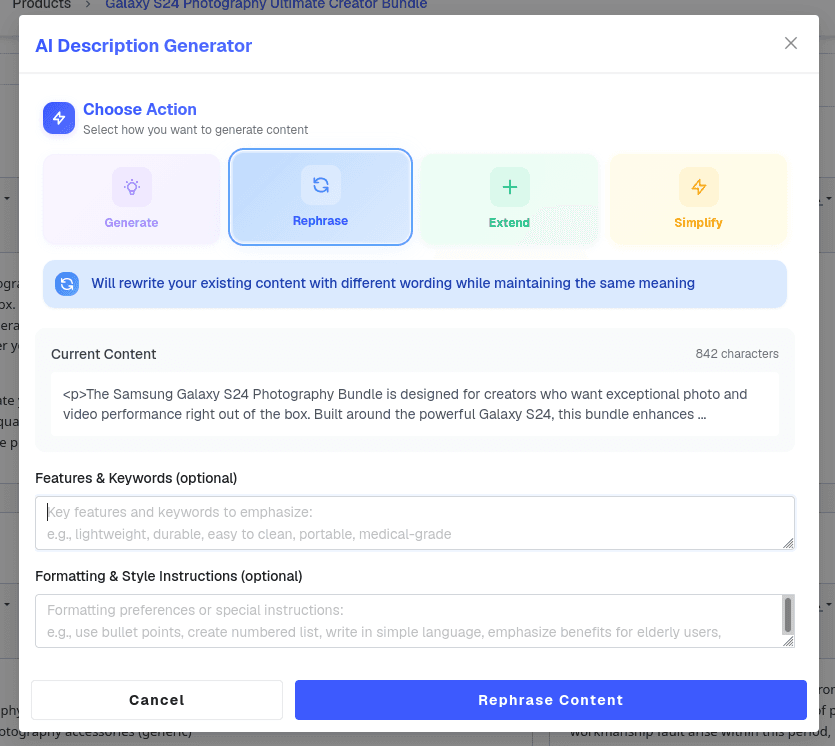
Writes, rephrases, extends, or simplifies descriptions, specs, and meta text for any product, brand, or category field from a prompt.
TDCCommerce keeps every description, price, SKU, image, and category in one place. Update a product once and every channel that sells it stays accurate.
Items
Writes, rephrases, extends, or simplifies descriptions, specs, and meta text for any product, brand, or category field from a prompt.
Swaps backgrounds, fixes lighting and color, removes stray objects, and gives product photos a studio finish without altering the product.

Recommends the right store categories for each new product and marks a primary one, so nothing sits uncategorized.

Matches every product to Google's product taxonomy, so Shopping listings pass Merchant Center checks without hand-picking categories.

Answers shopper questions on the store from your catalog, FAQ, and policy data, and drafts the reply for your team when a person is needed.

One fixed item with one SKU and one price, and no variations. Set it up once and it is ready to list and sell without any further configuration.
One parent with options such as size, color, or material. Every combination becomes its own child SKU with its own stock count, while shared details stay on the parent.
Items the buyer configures before purchase, choosing dimensions, materials, or components. Each configuration prices and fulfills exactly as the customer specified it.
| Feature | The Usual Setup | With TDCCommerce |
|---|---|---|
| Add a new product | Enter it in the store, the ERP, and the marketplace | Once |
| Fix a wrong price | Change it in every channel | One change, every catalog |
| Write a description | Staff write it or paste the supplier's | AI drafts it from the product |
| A photo has a cluttered background | Send it to a designer | AI swaps the background |
| Wholesale needs a different catalog | A second store or a PDF | Give the account its own view of the catalog |
| Where is the latest manual | Somebody's shared drive | On the product record, used everywhere |
| Which Google category fits | Search the taxonomy by hand | AI suggests it |
See how TDCCommerce keeps your online store, the warehouse, and the books reading from one product record, and what that takes off your team's week.
Yes. The store's catalog, search, and product pages read straight from PIM, so there is no export or sync step.
Yes. Each catalog controls its own product selection, pricing, and content, so a wholesale buyer and a retail shopper can see different things.
It drafts and rewrites descriptions and specs, edits product images in place, picks store and Google categories for new items, and answers shopper questions.
In the Digital Asset Management library, filed under each item, so the current version is the only one anyone can pick.
Yes. Select the products, change the field, and every one of them updates together, with the change logged.
From the records you maintain here. Brands, categories, and attributes become the store's filters and search results as soon as you save them.